
Holiday Creative: Match the Moment, Not Just the Audience

AI. Just hearing the word is sure to conjure strong feelings, be it excitement for a new frontier or sweat-inducing nerves about the unknown. However, given the rapid development and adoption of AI in marketing and the world at large, we must afford AI some meaningful attention.
While Google & Meta—platforms on which nonprofit marketers heavily rely—have been integrating AI into their algorithms and tools for years, their focus on it has accelerated. They now offer many powerful AI solutions for audience targeting, content optimization, and conversion attribution, however, that doesn’t mean digital marketing campaigns are now set-and-forget or completely autonomous.
Think of these new AI tools as different sections of an orchestra. Alone, they can produce beautiful music, but we wouldn’t let them all loose to improvise at the same time. Even when a score is provided (i.e. a well-defined goal), the AI orchestra still needs a human conductor to provide strong strategy, oversight, and course corrections along the way. Together, with our human knowledge and AI capabilities, we can create something more than the sum of its parts.
Keeping a test-and-learn mindset is key as we make AI an ally to improve marketing efficacy. The more we’re able to test, analyze, and lean into the full suite of Google & Meta’s tools, the more opportunity they have to deliver a full-symphony effect on results. We must use what works well for our organizations and let go of what’s not a good fit. We know the abundance of options is overwhelming. So to conduct like a pro, employ these tools strategically, evaluating and making adjustments often.
Dive Deeper
We discussed leveraging AI in Google and Meta in a livestream conversation on April 24—sign up below to watch on demand.
Embracing AI tools is critical because the opportunity cost of not trying them out is growing by the day. Jump in, start testing, and see if any of these AI tools can help decrease rote manual tasks and free up time for strategic thinking to drive results.
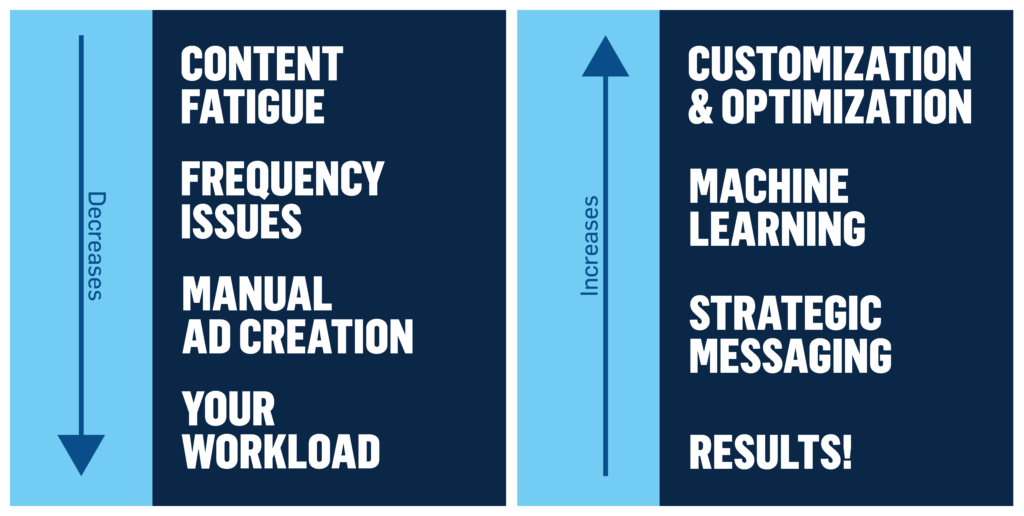
Because Meta & Google are still the powerhouses for marketing arts and culture, we suggest starting there. Below is a quick tour of the content & delivery tools available, and a few things to look out for.
What does it do?
This tool activates all placement options for Meta ads (there are 20+ placements!). Someone might scroll through Instagram stories today, but only check their Facebook desktop at work tomorrow—it’s great to meet them where they are.
What’s its potential impact?
Using multiple placements increases the number of people who can see our ads and can improve ad results at no additional cost. Plus, top-performing placements can change for each campaign. The environment of social media changes too fast and what works best is so different from person to person, so pre-selecting placement options could suppress opportunities to be seen.
When should we use it?
Anytime! As long as ad previews are satisfying across all placements, turn it on!
What does it do?
Meta takes our original ad and applies optimizations to our images and video to enhance performance.
What’s its potential impact?
Meta sees an average of 14% more incremental purchases per dollar when standard enhancements are turned on using Advantage+ Creative.
When should we use it?
If the list of available shifts doesn’t present any issues, all the time! If there are concerns (like if the auto-added music won’t match the promoted artists) turn that one off, and leave the rest of this feature on.
What does it do?
This tool multiplies the power of one ad by adding up to 5 headlines, primary text options, and descriptions, then mixes and matches the copy points with the visual to learn what works best.
What’s its potential impact?
Meta cites that differentiating creative generates a 9% average increase in incremental reach, and a 32% average increase in cost efficiency.
When should we use it?
Use this tool whenever there is more than one reason to buy a ticket or see a show, so long as both work well with the same visual. Try this with as few as 2 text options.
What does it do?
First, input a variety of assets: up to 5 of each copy point, up to 5 buttons, and up to 10 visuals. From there, AI & machine learning will experiment with tons of versions of the ad using one of each asset type, crafted from our input.
What’s its potential impact?
As noted above, Meta cites that differentiating creative generates a 9% average increase in incremental reach, and a 32% average increase in cost efficiency. This is the BEST way to differentiate every part of the creative, so Meta’s AI can serve out a different combination each time a consumer sees the ad.
When should we use it?
This is extra fantastic to use at the start of a campaign, before production photos and lots of assets are available. If the first few weeks using them works well, feel free to keep this format throughout the whole campaign, or to switch back to static ads when there’s something that needs a locked-in copy & visual match. Read more about when to use this tool here!
What does it do?
Powered by Google AI, Performance Max allows advertisers to serve ads across all of Google Ads inventory (Search, Display, YouTube, Discover, Gmail) to find potential customers based on a goal. While targeting is fully automated, adding Audience Signals (like Remarketing lists, and In-Market and Affinity Audiences) will help steer the algorithm and shorten the learning phase. Ad creative is dynamically created for each placement based on provided text, image, and video assets.
What’s its potential impact?
The goal of Performance Max is to find more converting customers, drive more conversion value, and gain additional reach beyond search campaigns. Per Google, they see advertisers gain at least 11% more conversions at the same CPA.
When should we use it?
Use this for specific conversion goals, active search campaigns, and image, text, and video content without strict requirements about ad placements or how they may appear—Performance Max does not provide data on where ads appear. Performance Max also works best with as much data as possible; a minimum campaign length of 4-6 weeks and a healthy budget is recommended, though it is designed as an “always on” solution.
What does it do?
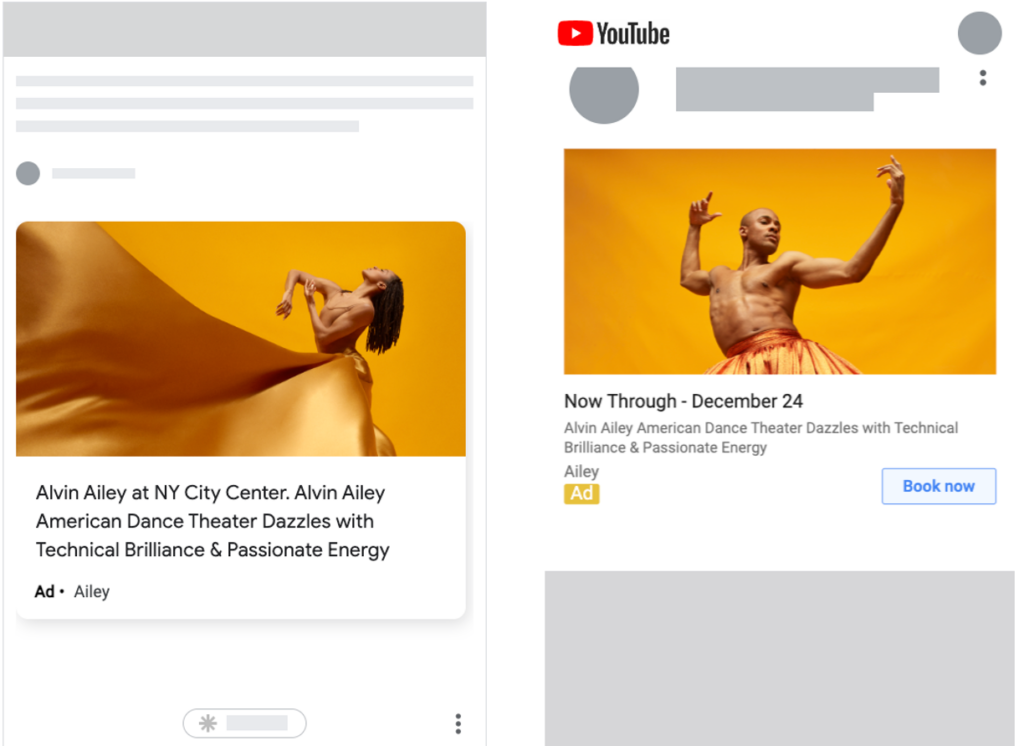
Demand Gen places ads across Google’s most visual channels (YouTube incl. Shorts, Discover, Gmail). This campaign type targets specific audience segments and can include AI-powered lookalike audiences. Like with Performance Max, Ad creative is dynamically created for each placement based on provided text, image, and video assets.
What’s its potential impact?
The goal of Demand Gen is to drive engagement and action. Think of it as Google’s version of social advertising—they see it as a way to capture users’ attention while they are in the consideration phase, scrolling their feeds. In fact, the reach on these channels is up to 3 billion monthly active users.
When should we use it?
Use this with a robust visual asset to access multiple Google placements without sacrificing full targeting control. The ability to both target specific audiences and harness the power of Google AI to expand to lookalikes makes this campaign type unique!
What does it do?
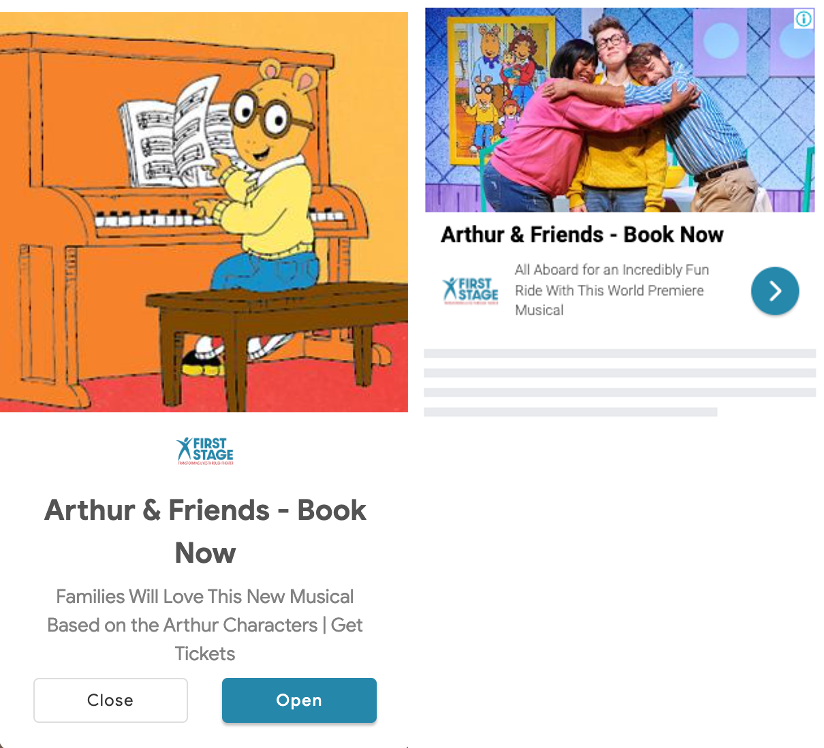
RSAs dynamically create search ads from the provided headline and description text. Per Google, using as many of the 15 headlines and 4 description options as possible will set ads up for success.
While RSA is the default (and only!) search ad format, the introduction of (optional) automatically created assets (ACA) for RSA adds another layer of AI to the formula. New headline and description assets are generated based on the landing page, existing ads, and keywords, and in some cases use GenAI to generate new assets “more relevant” to the search queries.
What’s its potential impact?
RSAs have already proven their value as an important tool for search performance. ACAs can fuel the algorithm with even more headline and description options for RSAs, creating more unique ad combinations to potentially compete in more auctions and serve more ads.
When should we use it?
RSAs are essential to search campaigns; we all should be using them!
To opt-in to ACA:
A key part of utilizing AI and machine learning is having good data to inform those algorithms. Bad data or not enough data will lead us to the dreaded “garbage in, garbage out” problem. As cookies and browser-based methods are able to track less, ad platforms are encouraging the adoption of several new mechanisms to enhance our ability to measure now and retain it in the long run.
What does it do?
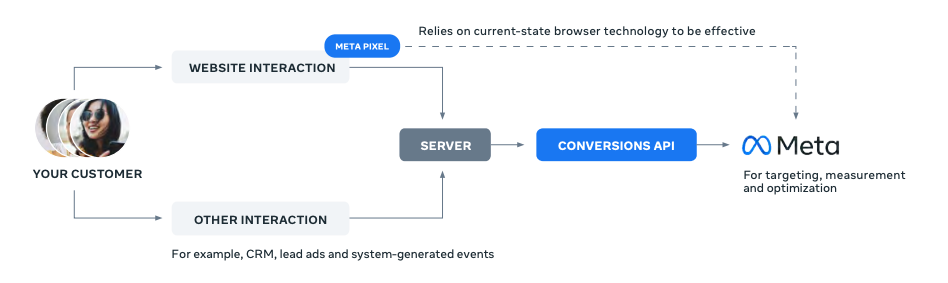
CAPI establishes a direct, reliable connection between an organization’s website and Meta’s servers, without relying on the browser.
What’s its potential impact?
Meta reports using CAPI can immediately lower cost per result by 13% and lead to 19% more purchase events. It will also critically sustain the ability to measure as cookies are deprecated as well as provide better and more complete data to fuel the algorithms that optimize ad delivery.
When should we use it?
CAPI is much more technical than the pixel, and implementing it can be challenging. Even if we see a strong conversion volume attributed to campaigns now, we don’t want to have to scramble if and when that starts to decline. Tackling that process now will mean we’re will be set up for the future.
What does it do?
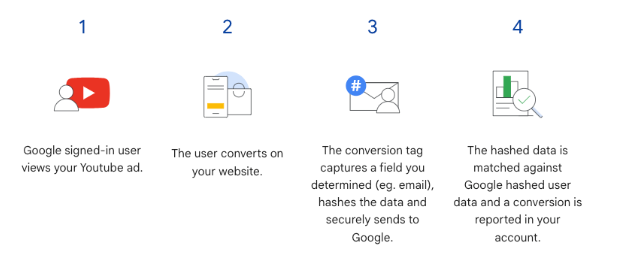
These tools securely share hashed, anonymized user data when a conversion happens, helping to measure the success of our campaigns more accurately.
How does it work?
The platforms have their own user account data. This user data is collected from the client website—usually an email address—then anonymized and protected using a secure one-way hashing algorithm, allowing the platforms to match that user’s conversion to ad impressions without revealing personally identifiable information.
What’s its potential impact?
Because some conversion tracking is already lost due to blocked cookies, using these features may result in a “conversion lift”: an increase of conversions attributed to campaigns by between 5%-15%. We already use first-party data for targeting (think of uploading a list of emails to reach past ticket buyers on Meta). Now, we can use that same data to measure campaign success.
When should we use it?
We can turn on this feature at any time, though some setup is required. Organizations should also consider the risk associated with sharing even hashed email addresses with advertising platforms and if privacy policies cover that use of data.
want a helping
(human) hand?