
How to Claim Your Organization’s Business Profile in ChatGPT

 AUTHOR:
Dan Titmuss
NOTE: Updated November 2026
Google processes billions of searches every day. For arts and culture organizations, appearing in those searches is a huge opportunity to reach new audiences, build awareness, and drive ticket sales.
But Google Search has changed quite a bit over the last few years. Traditional search results now appear alongside AI-generated answers, videos, social media posts, and more. That means your organization’s visibility on Google isn’t just about getting people to click through to your website anymore.
Fortunately, Google gives us a free tool to help understand all of this: Google Search Console.
Search Console helps you monitor your website’s search performance, troubleshoot technical issues, and discover how audiences find your organization online. And thanks to some exciting updates in 2026, we can now use it to better understand our visibility in AI Search and across social media and video content, too.
Let’s explore six ways to use Search Console to improve your SEO strategy.
I’m not kidding. Google only makes money if people click on the ads at the top of the SERP so they want searchers to find web pages with content that answer queries asked on their search engine. But, people are only going to use the search engine if the organic search results underneath those ads are relevant. This section is what people use the SERP for and optimizing your website helps it:
That’s why Google gives us the Search Console: a free tool that helps you monitor your site’s search traffic performance, troubleshoot issues, and make your site presence stand out on the crowded SERP.
Search Engine Optimization (SEO) is indispensable to arts marketers because it optimizes your organization’s website content to become more relevant and rank highly on the SERP. At its core, a good SEO strategy helps:
Adding the Search Console to your SEO toolkit is like having a supportive best friend that helps you achieve all of those goals! You don’t have to check in with each other every single day, but if it finds something interesting or has new information that you need to know, your Search Console BFF is there with advice on how Google crawls, indexes, and serves websites.
Plus, it fills you in on everything you need to know about the organic search data associated with your site like what search queries are attracting users to your site, how many times people click on each page, the click-through rate (CTR) of your listings, and more.
Intriguing, right? Well, I’m here to share with you four key tips you’ll need to make the most out of the Search Console and unlock new opportunities to level up your SEO strategy. Fair warning: it’s about to get technical, but I’ve made sure it’s actionable!
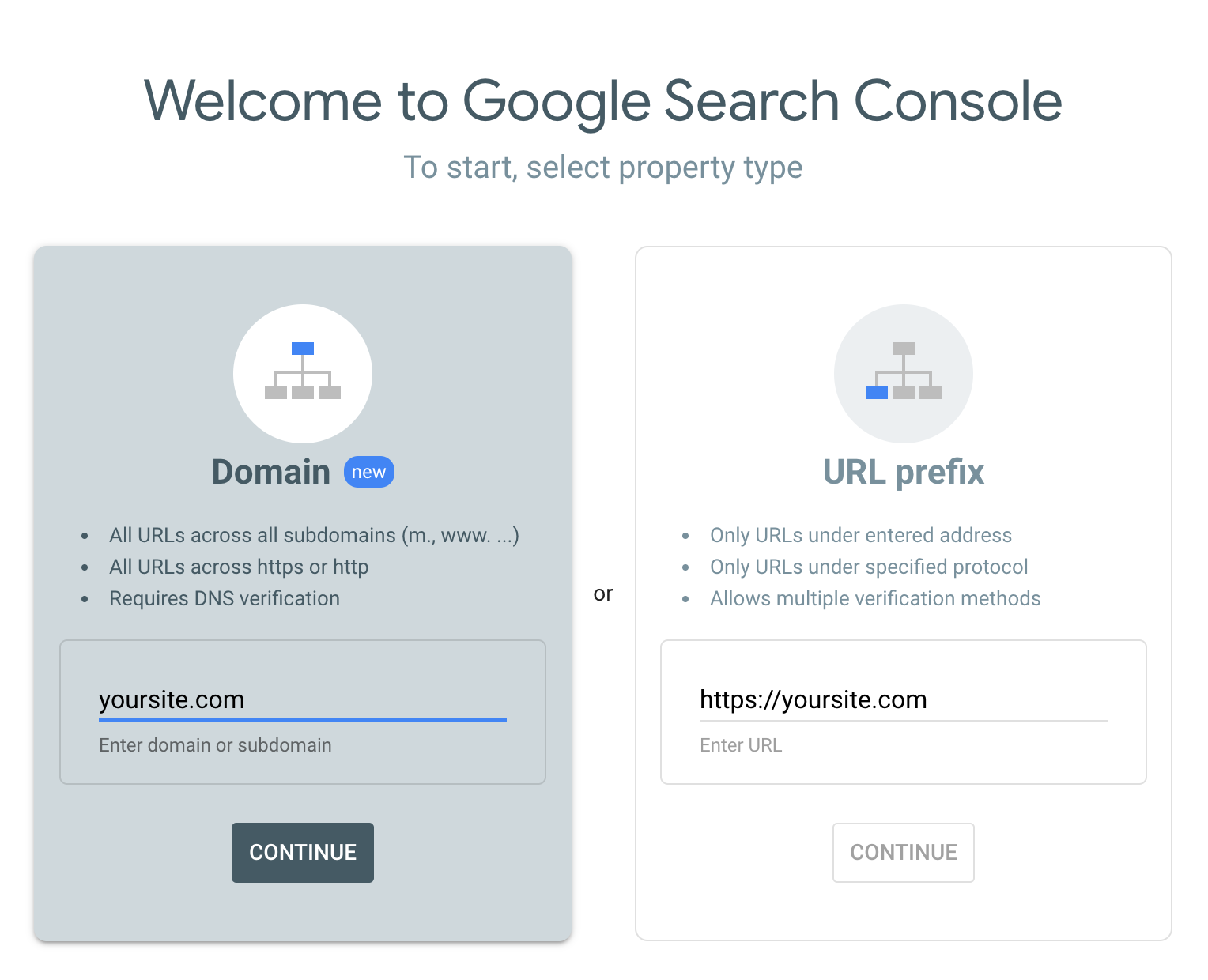
Google doesn’t want to give control to your site’s organic search data to just anyone, which is great news for your organization in today’s ever-evolving data privacy landscape! You’ll first need to prove that you own your site by navigating to Google’s Search Console, setting up an account, and making a small change to your Domain Name Server (DNS). If you don’t know what this means, pass it along to your IT department or the person at your organization who knows where your domain is hosted to make that update.
Ideally, you should create the Search Console account with the same Google profile that you use as the Admin of your Google Analytics account. This way, the two can be linked.
Pro Tip: Add a Domain level property—it ensures you’re capturing all the search traffic associated with your website.
There are usually at least four versions of a domain:
Version 1: http://yoursite.com
Version 2: https://yoursite.com
Version 3: http://www.yoursite.com
Version 4: https://www.yoursite.com
While the URL Prefix property is used for more specific cases, it can end up missing some of those different versions of your site and won’t capture all the search traffic associated with your website.
Like I said before, one of the most valuable benefits of the Search Console is the ability to look at how your website is performing on the SERP.
When you navigate to the Search Results tab within the platform, you can view a graph with data over time. You can also apply several filters that show the number of clicks and impressions, average CTR, and average position of your site on Google.
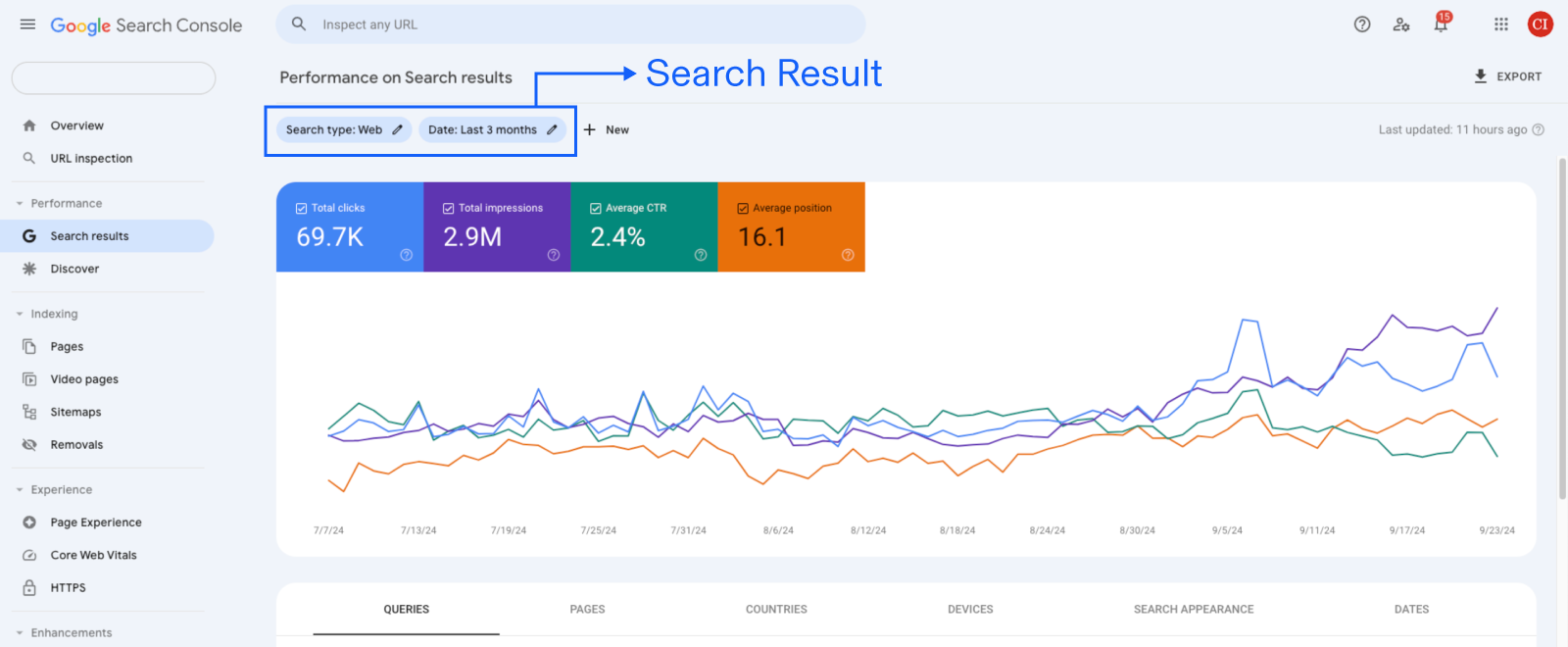
But data without any context isn’t useful. There are tabs on this page to see the performance for queries, pages, and more.

One of the most important distinctions to make when looking at search traffic is between branded and non-branded traffic. Identifying the two helps you understand a searcher’s intent to better target your audience and improve your SEO strategy.
Branded Traffic is any search query that contains your organization’s name.
Using keywords with your organization’s name in your ad copy to appear in the first position on the SERP is fairly easy. Google is smart, and remember, they want users to find your organization if they are looking for it.
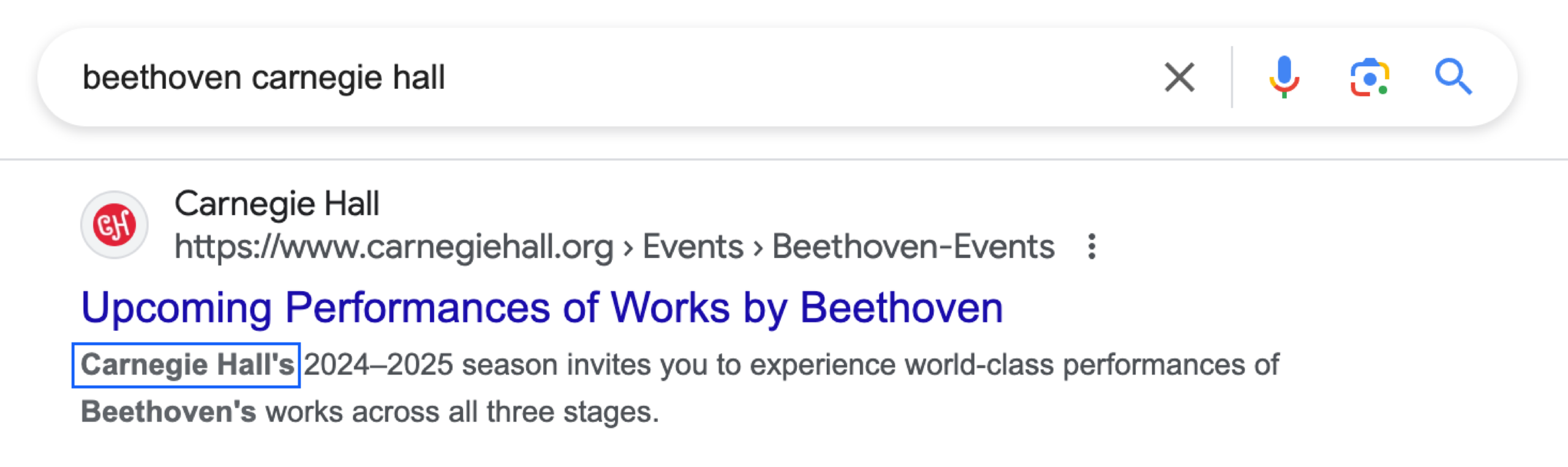
Non-branded traffic is any search query that does not contain your organization’s name.
Non-branded traffic is more challenging to attain since it isn’t always immediately obvious what users are looking for. Think about how many organizations are relevant for the non-branded term “theatre tickets” vs. the branded term “signature theatre tickets”. “Theatre tickets” is relevant to many organizations, and other websites are also actively trying to target this search which makes the term much more competitive. However, non-branded searches can be extremely valuable since they can introduce new users to your site.
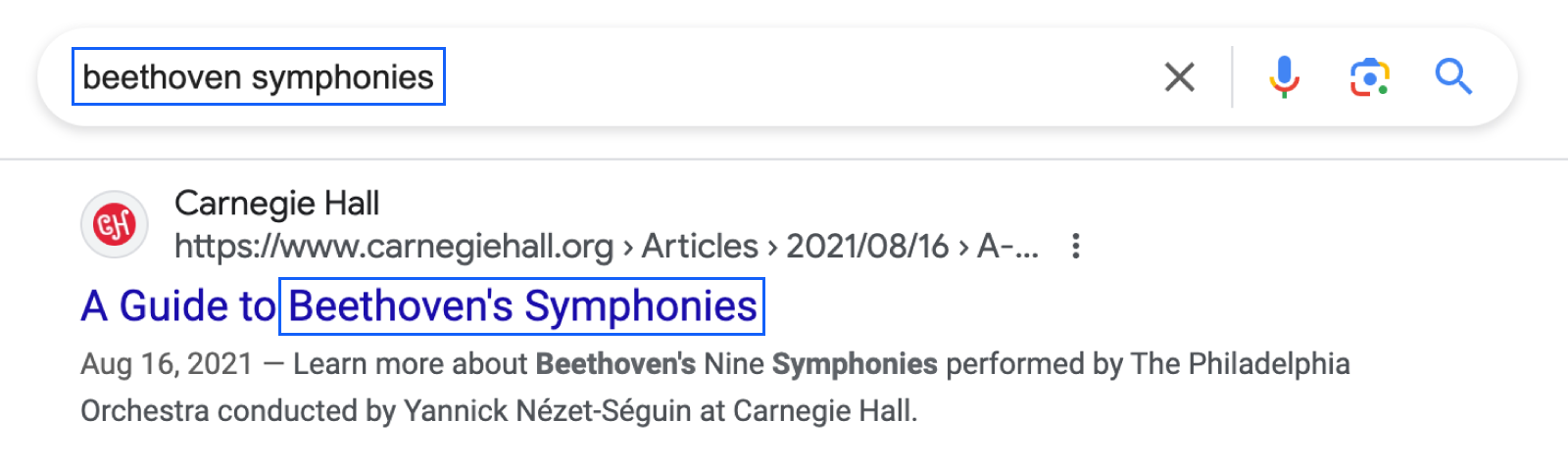
The Search Console allows you to filter queries containing or not containing specific terms. This is great because you can discover the exact queries and terms that drive the most traffic to your site (and learn which drive the least).

At Capacity Interactive, this is one of the first things we look at when examining a site.
The second tab on the Search Results section of the Search Console is the Pages section.

This can show what pages are driving organic search traffic to your site. Select a page by clicking on the URL (or using the filter) and navigating to the Queries tab. You can see all of the queries users are typing into the search bar when your listing appears.
This can provide some fantastic insights into what users are searching for, and help you optimize your pages. Perhaps users are typing in “cello lessons” instead of “cello classes” when a music education page appears. You can improve CTR by including this search term in the Title Tags or Meta Descriptions of the page. You get all this information, just by looking at the Search Console!
Picture it: You’re comparing your website’s month-over-month data in Google Analytics, and notice a drop in page sessions from organic search traffic. Yikes. With the Search Console, you can actually see what queries caused this decline and discover what pages saw the biggest change in page visits to your website over time. (Exciting, right?!) Click on the Date Range, and compare the time periods that you want to look at. Or, set a custom time period!
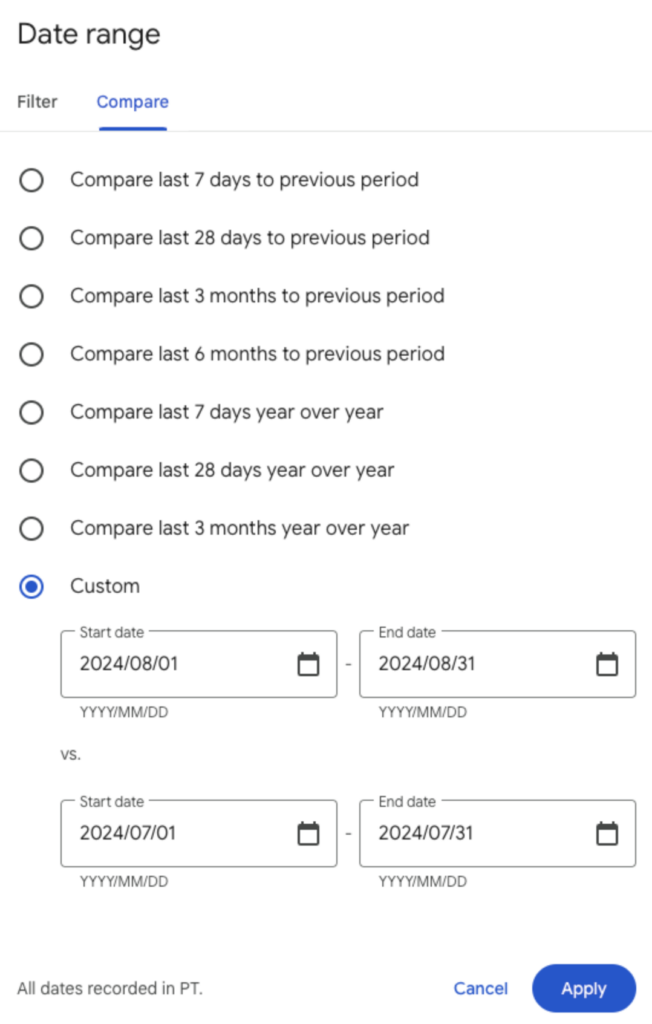
Then, navigate to the tab you want to analyze (either the Queries or Pages) and sort by largest decrease. With this insight, you can identify whether these decreases make sense seasonally or if something has gone wrong with your SEO.

If you are a glass-half-full kind of person, this also works for analyzing increases in traffic as well.
Here’s where things get particularly exciting!
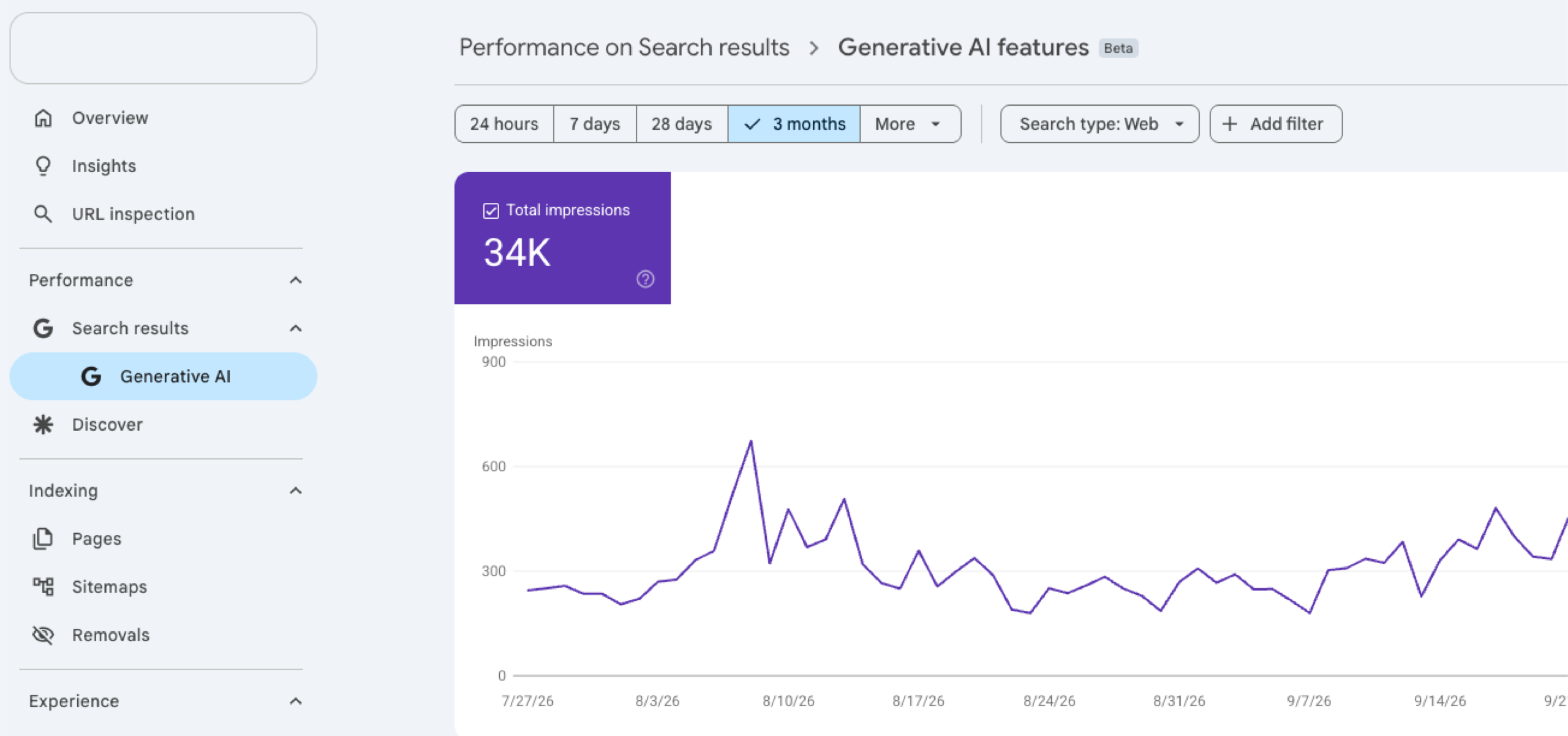
In 2026, Google introduced a new Generative AI performance report within Search Console, giving us our first dedicated look at how our websites appear in Google’s AI-powered search experiences, including AI Overviews and AI Mode.
Previously, understanding this kind of visibility was extremely difficult. Now, we can see how frequently our content appears in AI-generated answers, which pages are receiving the most impressions, and how that visibility changes over time.
The report isn’t perfect. We still can’t see the specific searches or prompts that generated these impressions, and there are questions about what Google counts as an impression. But even with these limitations, we’re already getting some fascinating insights.
At Capacity, we recently analyzed AI Search visibility across eight arts and culture organizations. We found that educational content accounted for 58% of the pages we analyzed but generated 73% of all AI Search impressions. Meanwhile, transactional pages, including ticketing, event, and calendar pages, generated just 11% of impressions.
This suggests that educational resources, including program notes, exhibition guides, and blog articles, can play an important role in helping new audiences discover your organization through AI Search.
Read our full analysis: AI Search Data Is Here: Educational Content Is Winning.
To explore your own data, open the Generative AI performance report and navigate to the Pages tab. Which pages are appearing most frequently? Are there certain subjects or types of content performing particularly well?
These insights can help you decide which existing resources to update and where to focus future content creation.
Pro Tip: Don’t evaluate AI Search visibility using the same metrics as traditional organic traffic. Impressions tell us about visibility, not necessarily website visits. Instead, look for patterns in the types of content appearing in AI Search, and use those insights to inform your broader SEO and content strategies.
Here’s another exciting update: Search Console isn’t just for websites anymore!
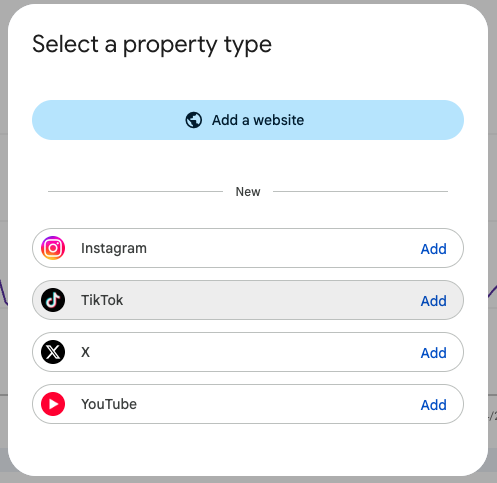
In July 2026, Google introduced platform properties, allowing organizations to connect supported Instagram, TikTok, X, and YouTube accounts directly to Search Console.
Why does this matter? Because your website isn’t the only place people discover your organization through Google. Your videos and social posts can also appear in search results, giving you another “owned” listing on the SERP for your content to appear.
To get started, select Add property in Search Console, choose the platform you want to connect, and follow the verification instructions.
Once connected, you can explore how your content performs in Google Search, including clicks, impressions, popular posts, and the queries that help people discover them.
For example, your theatre might discover that a behind-the-scenes YouTube video is appearing in Google searches about theatrical set design. That’s a great opportunity to identify subjects that resonate with audiences and inform future content creation.
These insights are another reminder that search should be part of your broader content strategy, not something you only consider when updating your website. Understanding what audiences are searching for can help you create more relevant videos, social posts, and other content that reaches people beyond your existing followers.
Pro Tip: If your organization publishes regularly on YouTube, combine Search Console’s Google Search data with YouTube Analytics for a fuller picture of how audiences discover and engage with your videos.
Learn more about developing a YouTube SEO strategy using channel data.
The Search Console is one of the most valuable, easy, and free tools in your arsenal—and we’re here to help you dive into data galore. If you have questions about how to set it up or need help getting started with SEO for your website, let’s talk.